

The 7-38-55 Rule and the Dominance of Body Language
Learn nonverbal communication to build confidence, credibility, and leadership by reading posture, gestures, eye contact, and voice tone with the 7-38-55 rule.
Watch Video For Onlinecourses55
|
2026-11-10
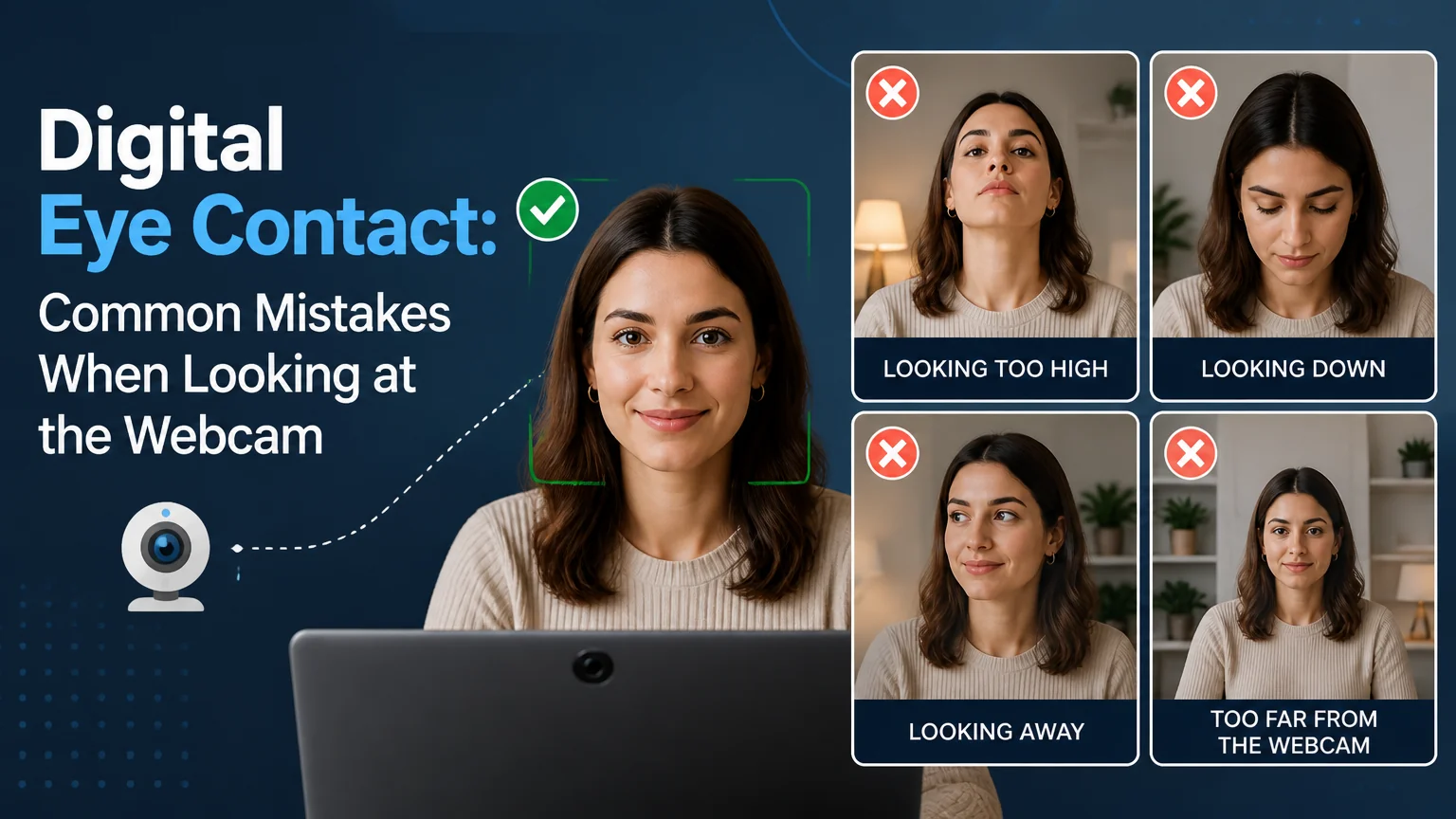
Digital eye contact: common mistakes when looking at the webcam
Looking directly at the camera can significantly enhance your connection in virtual meetings. Explore best practices for engaging visuals that enhance your credibility during online conversations.
Being in front of a camera can feel strange, even for people with a lot of experience in meetings. The key to conveying confidence and connecting through the screen lies in a simple but hard-to-master perception: where you look and how you do it. Below you will find the most frequent mistakes and, above all, practical techniques to correct them without turning the experience into something rigid or artificial. The goal is for your gaze to reinforce your message, not distract from it.
The human brain associates eye contact with attention, credibility and empathy. In a video call there isn’t the same context as in an in-person meeting, so the lens becomes the symbolic bridge between you and the other person. When you look at the screen instead of the lens, the listener perceives that you are looking down or to one side, which reduces the feeling of connection. Achieving a balance between observing your interlocutor and looking at the lens is what makes your message feel both close and professional.
It’s natural to want to read reactions on the screen or check how you look, but if the main window is far from the lens your gaze shifts. The effect is noticeable immediately and breaks the sense of direct dialogue.
Obsessing over looking at the camera all the time produces a tense gaze. The lack of blinking and microgestures makes you look robotic. In real communication we alternate between the interlocutor, notes and support points, so continuous eye contact is not natural.
When a text occupies a large part of your monitor, your eyes move horizontally or vertically. Others notice it immediately. Also, reading word by word hardens the tone and makes your voice sound monotonous.
A low angle makes you look as if you’re looking down on the interlocutor; a high angle projects submission and reduces presence. Both angles also exaggerate facial features and distract.
A lens with fingerprints leaves a dull image; poorly placed lighting produces reflections that make you squint or look away.
If the chat, notes and presentation are spread across different monitors, your eyes jump constantly. For the viewer, that translates into disconnection.
Spend around 80% of the time speaking while looking at the lens and 20% checking reactions on screen or reviewing notes. This balance feels human while maintaining connection.
Shrink and move the video call window just below the lens. If you use notes, place them in a narrow top strip as close to the camera as possible so the eye movement is minimal.
Stick a small dot or arrow next to the camera. It works as a gentle reminder to return your gaze when you drift. Over time it becomes an automatic habit.
Record clips of 30 to 60 seconds answering a question. Review where your gaze moves and adjust the position of windows and camera. Two or three repetitions are enough to fine-tune before an important meeting.
Smile naturally, nod and use pauses. Expressiveness compensates for the moments when you’re not looking at the lens and maintains the emotional connection.
Place the camera at eye level and about 50–70 cm away, depending on the framing. Your head and part of your shoulders should be visible. If you use a laptop, raise the device with a stand or books to avoid an upward angle.
An overly wide framing reduces presence; one that’s too tight exaggerates eye movements. Adjust the zoom so there’s a small margin above your head and space at the sides.
Light from the front and slightly above eye level reduces shadows and makes it more comfortable to keep your eyes open. Avoid strong backlighting, as it forces you to squint.
Turn off or minimize your self-view. Constantly looking at yourself distracts you and shifts your gaze. Most platforms allow hiding it without affecting others.
When several people speak, alternate: look at the lens when making your point, and briefly look at the screen when someone else speaks to read their nonverbal cues. Keep the active window below the camera.
For key answers, prioritize the lens to emphasize confidence. When listening, you can look at the screen to show attention. Keep notes as keywords near the camera rather than full paragraphs.
If you share your screen, place the notes bar next to the lens. Mark points where you will return to the camera: opening, transitions between sections, and closing. That cadence re-engages the audience.
Empathy is crucial. Repeat the customer’s concern while looking at the lens, then look at the screen to validate reactions and return to the lens when offering the solution. Avoid typing while they speak; take brief notes with a pencil if necessary.
If you need to check data or look something up outside the main screen, briefly let people know. Expressions like "I’m going to check a detail for a few seconds" legitimize the gaze diversion.
Leave micro-pauses at the end of a sentence while looking at the lens. This gives space for the other person to respond and prevents you from seeming to interrupt. If you notice delay, lengthen pauses slightly and nod to show active listening.
The comfortable level of eye contact varies by culture and individual needs. Watch for signals: if someone avoids the camera, don’t insist; prioritize message clarity and a respectful tone.
Mastering gaze on video calls isn’t a matter of rigidity, but of intention. With small equipment adjustments, framing that favors your posture, and simple habits like relocating windows or applying the 80/20 rule, connection becomes immediate. Practice with short clips, ask for feedback, and turn the camera into an ally. Naturalness will come when your primary attention is on the conversation and you use the lens as the invisible thread that holds the connection.
Do you prefer learning by watching and listening? Expand your knowledge with these free videos related to this topic.
Learn nonverbal communication to build confidence, credibility, and leadership by reading posture, gestures, eye contact, and voice tone with the 7-38-55 rule.
Watch VideoLearn how leaders can use gestures, posture, movement, balanced eye contact, and professional touch to project confidence, authority, and connection today.
Watch VideoUse the first 7 seconds to build trust with confident posture, expression, and eye contact, so the halo effect won't unfairly misjudge your leadership.
Watch VideoSearch
Popular searches